


Introduction
Before getting into this blog post, please review my original seven-part series that introduces “The Easy Way” and “The Hard Way” approaches to integrate Microsoft Foundry with SharePoint. The focus there was on architecture, security, and emerging best practices around allowing agents to reason over your company’s internal data.
However, I never actually went as far as plugging this into a custom app and repositioning Foundry as a separate logical layer in an Azure architecture. We’re all used to the conventional frontend/middleware/backend paradigm for modern cloud systems; this post will detail out how to include Foundry as the agentic backplane: a new, all-encompassing AI tier fully integrated into our systems.
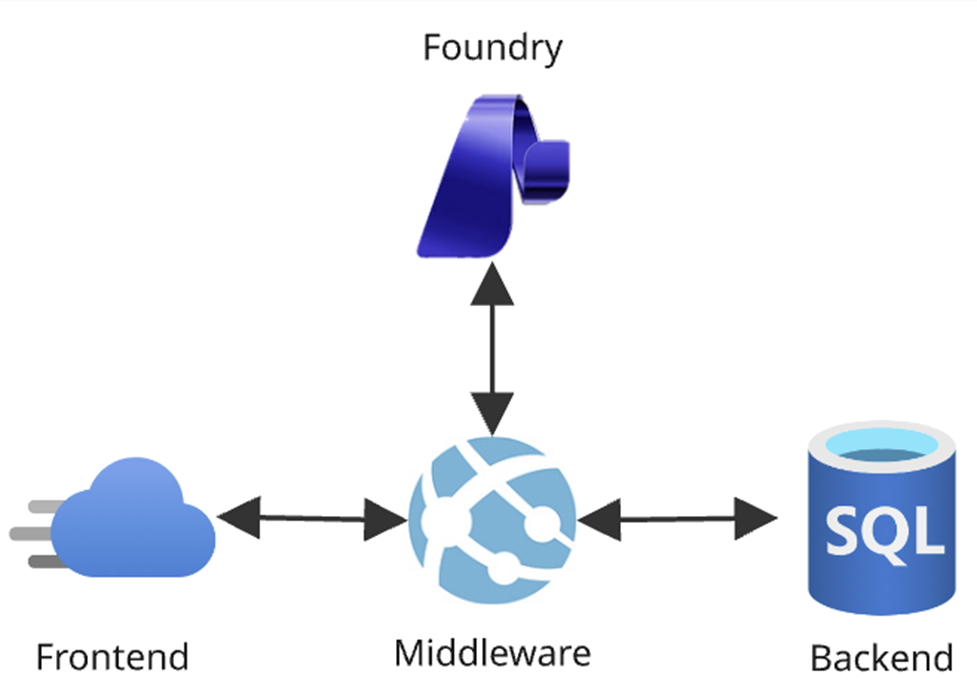
This (much smaller) blog series instead focuses more on app integration and production readiness (and less on SharePoint) to answer the question: “Okay, I’ve used Foundry and have a working POC…now what?” This first post will discuss layering Foundry into an Azure architecture. Next, I’ll share how to automatically promote agents to new environments. Then in the finale I’ll cover some interesting enhancements I’ve made to “The Hard Way.”
The Agentic Backplane
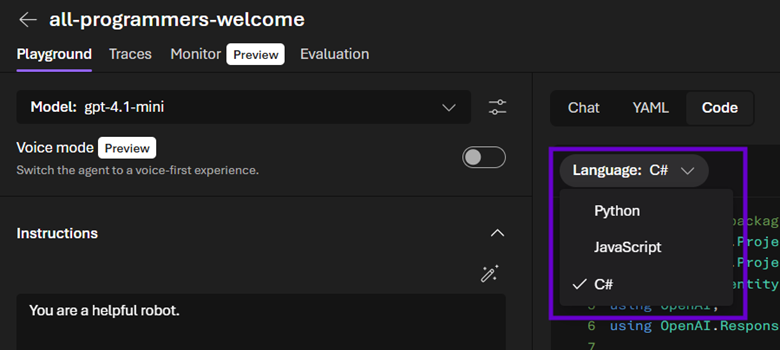
What excites me the most about Foundry is that it is bringing proper AI development to engineers living in the Microsoft ecosystem; I feel like I am getting my curly braces and semicolons back. We cannot only integrate the dozens of APIs under Azure AI Services into our apps easier than ever, but also explore the new Foundry Project endpoints that take interacting with agents in C# to the next level. And if you’re not a Redmond person, you’ll at least appreciate Foundry’s inclusive nature as it provides Python and JavaScript code samples front and center right alongside the C#.
Enterprise AI
But it’s about much more than just code; it’s about enterprise AI. Does simply calling a chat completion API mean that your system is part of the LLM revolution? On the one hand…technically, of course…but with the other hand having a firm grasp on Foundry, you’ll quickly learn that it’s much bigger than that.
Since Foundry has been implemented as an Azure resource, we can integrate it into the cloud architectures we’ve been leveraging for years using the tools we’ve been mastering for decades. This means RBAC, model deployments, APIs, observability, and a plethora of other tools built into Foundry can make our agents robust, scalable, and production ready for large scale releases to our users.
By treating Foundry as simply another PaaS component that we can include in our existing resource groups, deploy with our existing Azure CLI scrips, secure with our existing Entra ID configuration, and monitor with our existing telemetry tools, we can do much more than simply implement agentic user stories; we can manage an entire ecosystem of AI infrastructure and naturally layer it into our new or existing apps and let it keep our systems surfing atop the crest of the LLM wave.
In addition to all the enterprise functionality we can leverage in Foundry due to its nature of having been implemented as an Azure resource (versus, for example, something like Copilot Studio which is a standalone tool whose agents can only be deployed to M365), we can also provision Foundry Projects under a single Foundry “Portal” instance and achieve AI tenancy: different models, agents, and tools secured for distinct user populations.
This allows us to plan our agentic infrastructure in way that will scale along with our organizations. AI engineers and end users in different departments can use Foundry’s playground experience and browser tools to create, secure, and test bespoke agents against the latest models specialized for their requirements and grounded in their data. And all of that comes along for the ride as AI developers automatically promote the entire agentic backplane – configured agents together with consumed APIs – up the environmental chain to production as part of a single, cohesive Azure architecture.
Foundry Project API
The “new” Foundry Project experience comes with its own API that allows developers to configure and automate their agentic backplanes as well as interact with agents and workflows. This is what empowers us to do full enterprise AI development leveraging Azure and the .NET framework.
This is a big paradigm shift away from “conventional” C# work in this space, where the focus was on consuming Azure AI Services (f.k.a. Cognitive Services) via API calls. If you needed to do chat completions for example, you’d have to provision an Azure OpenAI PaaS resource and then consume its endpoints in your code.
However, leveraging the Foundry Project API changes this to a much more agentic approach. Instead, the code interacts with Foundry agents directly: feeding them user messages and parsing their resulting content. In this scenario, our robots can ostensibly be thought of as functions: single units of logic that convert inputs to outputs.
This change is a nice example of the agentic backplane concept: in this new world, we encapsulate AI logic directly in an agent via its instructions, tools, and other settings. Then when coding against the Foundry Project API, we use this agent as the completions endpoint to create chatbots (in the standard case) or query for data (in more advanced scenarios).
Now if we need to do “specialized” AI work, such as cracking open a file and enumerating its pages, Document Intelligence would still be the tool of choice. Or if we’re performing custom vectorization, we’d talk to an Azure OpenAI instance. These use cases don’t change as they aren’t part of the Project API, but Foundry still improves upon such scenarios by making all Azure AI services available from the Project’s parent Portal resource.
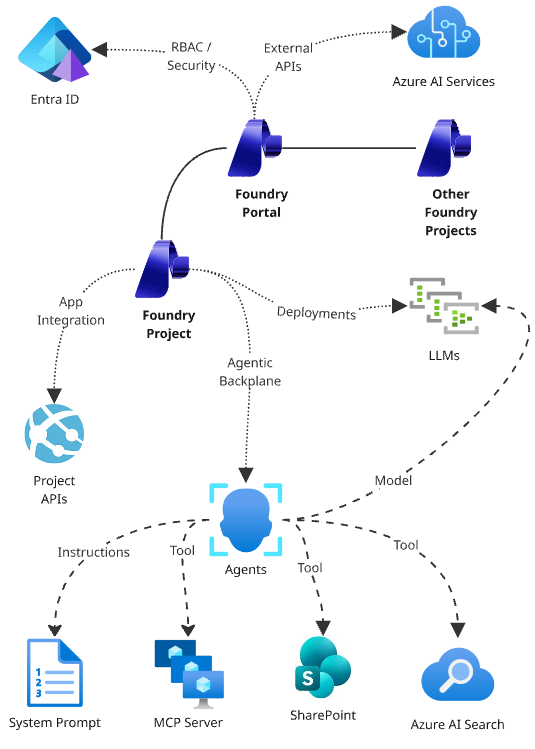
Our custom logic that consumed one-off Azure AI Services pre-Foundry doesn't change; we simply no longer have to provision separate PaaS components. Now, our agentic backplane has everything we need naturally layered into our architecture. These APIs (keys, versions, etc.) are then centrally managed in one place, vastly simplifying the surface area of our resource groups.
Let’s jump into the code and take a look at a sample method that uses the new Azure.AI.Projects APIs to converse with an agent. Note: null checks, try/catch statements, logging, etc. have been removed for brevity; I will include a link at the end of the post to the GitHub repo hosting the full FoundryService implementation.
1.	using Azure.Core;
2.	using Azure.AI.Projects;
3.	using Azure.AI.Projects.OpenAI;
4.	using Azure.AI.Agents.Persistent;

5.	. . .

6.	public async Task<AgentResponse<string>> ConverseWithAgentAsync(
		string agentName,
		string userMessage,
		string conversationId,
		Uri foundryProjectAPIEndpoint,
		TokenCredential foundryCredential)
7.	{
8.		//initialization
9.		AIProjectClient foundryClient = new AIProjectClient(foundryProjectAPIEndpoint, foundryCredential);
10.		AgentRecord agent = await foundryClient.Agents.GetAgentAsync(agentName);
11.		HashSet<string> annotations = new HashSet<string>();
12.		StringBuilder agentMessage = new StringBuilder();

13.		//get conversation
14.		ProjectConversation conversation = string.IsNullOrWhiteSpace(conversationId)
15.			?
16.				await foundryClient.OpenAI.Conversations.CreateProjectConversationAsync()
17.			:
18.				await foundryClient.OpenAI.Conversations.GetProjectConversationAsync(conversationId);

19.		//send the user's message to the agent
20.		ProjectResponsesClient responseClient = foundryClient.OpenAI.GetProjectResponsesClientForAgent(agent, conversation.Id);
21.		ClientResult<ResponseResult> response = await responseClient.CreateResponseAsync(userMessage);

22.		//get the agent's response
23.		foreach (MessageResponseItem outputItem in response.Value.OutputItems.OfType<MessageResponseItem>())
24.		{
25.			//get each piece of content
26.			foreach (ResponseContentPart content in outputItem.Content)
27.			{
28.				//capture answer
29.				agentMessage.AppendLine(content.Text);

30.				//collect annotations
31.				foreach (ResponseMessageAnnotation annotation in content.OutputTextAnnotations)
32.				{
33.					//only consider URL citations
34.					if (annotation.Kind == ResponseMessageAnnotationKind.UriCitation)
35.						annotations.Add(((UriCitationMessageAnnotation)annotation).Uri.ToString());
36.				}
37.			}
38.		}

39.		//return
40.		return new AgentResponse<string>(agentMessage.ToString().Trim(), conversation.Id, annotations);
41.	}
Starting off on Line #9, we create an AIProjectClient. This is the main entry point to the new API, taking in the URI to your Foundry Project, which is given by the following Bash Azure CLI command…
az cognitiveservices account show --resource-group '<your-resource-group-name>' --name '<your-foundry-name>' --query 'properties.endpoints."AI Foundry API"' --output 'tsv';…as well as presented front and center on the home page of the PaaS instance…
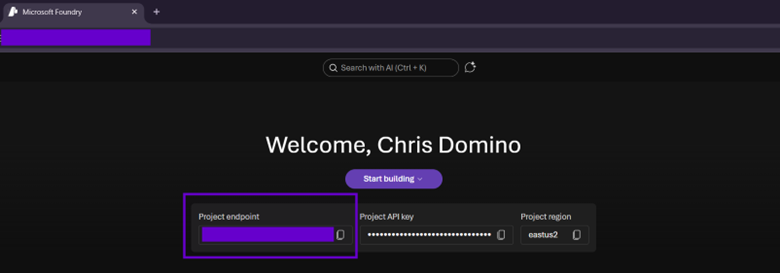
Then on Line #10, we get the agent by name (which is safe in Foundry, since it enforces uniqueness of this property). The next stanza (Line #’s 13-18) has simple logic that resumes an existing conversation or starts a new one if no id is given. We don't have to worry about memory or persistence here; the Foundry API handles all of that for us; our frontends simply need to maintain a single conversation id string in state.
Line #’s 19-21 then “client hop” to get a ProjectResponsesClient which abstracts OpenAI chat completions and sends the user’s message to the agent in the context of a conversation. Note that in the current beta is pretty slow (more on how to enable preview code compilation shortly) so Line #21 will chug for several seconds.
Next, we process the Agent’s response on Line #’s 22-38, walking through each ResponseContentPart of each MessageResponseItem and accumulating the agent’s answer (Line #29). Note that there are a lot of messages of various types that come back, so the OfType < MessageResponseItem > on Line #23 is a handy trick I use to only get the content we’d want to show to the user. At the end of the stanza is an example of how to pull annotations in case the target agent’s instructions tell it to include them.
Finally, we return the final agent’s response on Line #40. AgentResponse< T > is a simple DTO to handle both text responses (which could be improved to support markdown or even HMTL in a chat bot scenario) or an object (if the agent returns structured JSON in a more data-driven search-based use case).
Preview APIs
I built this using Visual Studio 2026 + .NET 10, which continues the IDE’s behavior of requiring developers to opt in hard to preview APIs. To allow this code to compile, there are three steps you need to follow. First, to get the NuGet packages, you need to search with the “prelease” flag turned on.
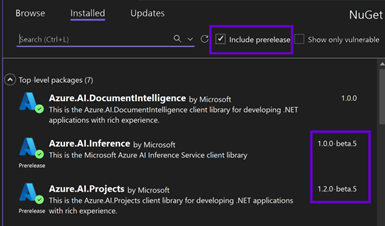
Then in any code file using these beta namespaces, we’ll need to include #pragma warning disable OPENAI001 before any calls made against them. Finally, in not only the Visual Studio .csproj containing the code, but also any others consuming it as a project reference throughout the solution up the dependency chain, we need to add the following:
<PropertyGroup>
	<EnablePreviewFeatures>true</EnablePreviewFeatures>
</PropertyGroup>
This feels like signing a waiver before bungee jumping off a bridge! But I don’t mind; this is an example of Microsoft keeping everything Kosher at the enterprise level by not only giving us beta bits so we can master new technology before it launches, but also adding a layer of protection for production systems against preview functionality.
SharePoint Authentication
In most agentic tool cases, you can impersonate service principals via an Entra ID app that has the permissions below (or a subset, depending on your requirements and adherence to least privileged security principles) against a Foundry instance. To do so, wrap its app id, tenant id, and client secret in a ClientSecretCredential and use that as the second parameter to your AIProjectClient object’s constructor.
- Contributor
- Azure AI User
- Azure AI Developer
- Cognitive Services User
- Cognitive Services Contributor
To achieve this, pull these three with strings from local settings files or preferably Key Vault (especially in higher environments):
return new ClientSecretCredential("<your-tenant-id>", "<your-app-id>", "<your-app-client-secret>"); However, this does not work for Foundry agents using “The Easy Way’s” out-of-the-box SharePoint tool (which is still in Preview). Since this grounding needs to run as the current user to perform dynamic content security trimming against site collection data, the API will reject impersonated requests with the following error:
[Sharepoint-tool] Request to Graph API failed with HTTP status 400, error-code: AuthenticationError and error-message: AppOnly OBO tokens not supported by target service.
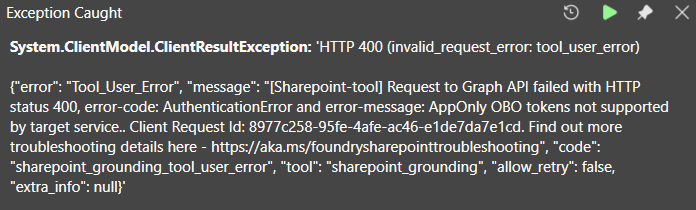
As long as the current user has a Copilot license, the SharePoint tool will function properly in the Foundry playground UI (since it’s in the “direct” context of an authenticated browser). However, it needs some additional handling to work in a custom app (because there, users are most likely authenticated via MSAL to Graph or your Entra ID app’s scope, not Foundry).
It might be tempting to instead use a DefaultAzureCredential, but that will only appear to work locally. While this can identify you via your Visual Studio authentication (or Azure CLI login or even your deployed app service’s managed identity when running the cloud), it won’t pick up the current user’s bearer token on the backend.
Instead, we need to configure our ASP.NET Core APIs to support downstream API token acquisition. Here are the salient bits from the Program.cs file hosting our backend:
1.	//initialization
2.	WebApplicationBuilder builder = WebApp.CreateBuilder(args);

3.	. . .

4.	//configure authentication
5.	builder.Services.AddAuthentication(JwtBearerDefaults.AuthenticationScheme)
6.			.AddMicrosoftIdentityWebApi((options) =>
7.	                {
8.				//configure JWT tokens
9.				options.Audience = "api://<your-entra-app-id>";
10.	                }, (options) =>
11.	                {
12.	                  	//configure MS identity
13.				options.TenantId = "<your-tenant-id>";
14.				options.ClientId = "<your-entra-app-id>";
15.				options.AllowWebApiToBeAuthorizedByACL = true;
16.				options.Instance = "https://login.microsoftonline.com/";
17.	                }).EnableTokenAcquisitionToCallDownstreamApi((options) =>
18.	                {
19.				//configure downstream api
20.				options.ClientSecret = "<your-entra-app-client-secret>";
21.	                }).AddInMemoryTokenCaches();
See the “Simplified Authentication” section in the third post in this series for more details; the main thrust here is that Line #’s 17 and 21 will add an ITokenAcquisition implementation to our dependency injection so that we can demand one in a controller's or service’s constructor. This code sample leverages the out of the box Microsoft Identity Web API authentication pattern.
An ITokenAcquisition instance can then be used to exchange the current user’s security token (using the app registration’s scope in this case) for one against a different scope (Foundry). Here’s the code from the API’s controller (comments, constants, Key Vault integration, and null checks have been removed for brevity):
1.	private readonly IFoundryService _foundryService;
2.	private readonly ITokenAcquisition _tokenAcquisition;

3.	. . .

4.	public FoundryController(IFoundryService foundryService, ITokenAcquisition tokenAcquisition,  . . .)
5.	{
6.		this._foundryService = foundryService ?? throw new ArgumentNullException(nameof(foundryService));
7.		this._tokenAcquisition = tokenAcquisition ?? throw new ArgumentNullException(nameof(tokenAcquisition));

8.		. . .

9.	}

10.	. . .

11.	[HttpPost("converse-with-agent")]
12.	public async Task<IActionResult> ConverseWithAgentAsync([FromBody()] ConversationPrompt prompt)
13.	{

14.  		. . .

15.		//exchange API token for foundry token
17.  		string foundryToken = await this._tokenAcquisition.GetAccessTokenForUserAsync(["https://ai.azure.com/user_impersonation"]);
18.
19.		//return
20.		return this.Ok(await this._foundryService.ConverseWithAgentAsync(prompt, new FoundryCredential(foundryToken, 60)));
21.	}

22.	. . .
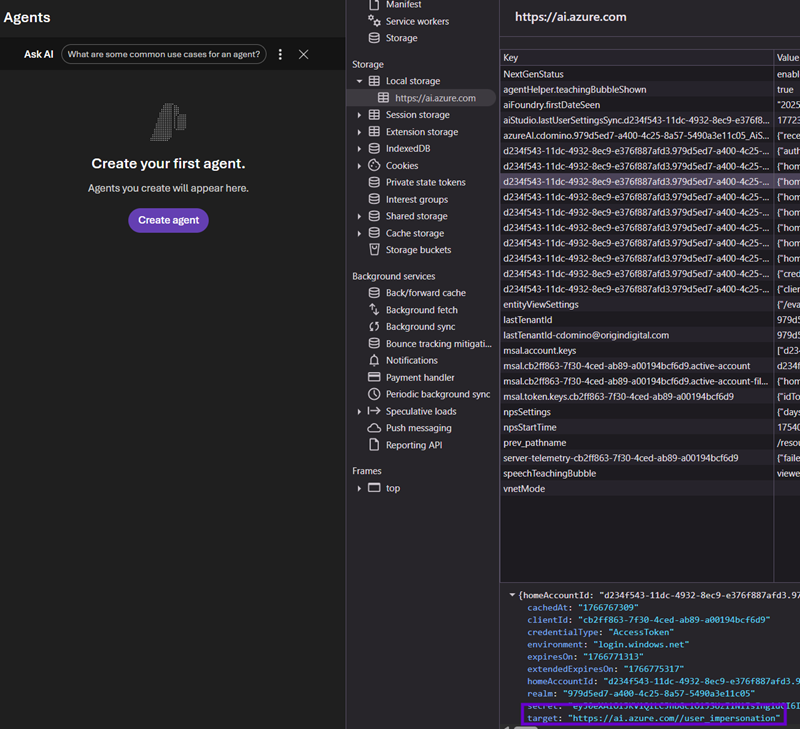
The magic happens on Line# 17 above. The current user’s bearer token, which contains their identity, is exchanged for a new token against a somewhat odd scope…not one that you will see when configuring security for Foundry or an Entra ID app. I got lucky and found this by logging into my Foundry Project browser UI and trolling my tokens in local storage:
Finally, we need to wrap this new token in a custom credential object that simply passes it through. In the GitHub repo, you’ll see an example of the full FoundryService method that accepts a generic TokenCredential parameter so can you either pass in the current user’s context or your Entra ID app’s service principal (via a ClientSecretCrednetial) to enable both core authentication scenarios.
1.	public class FoundryCredential : TokenCredential
2.	{
3.		private readonly string _token;
4.		private readonly double _expirationMinutes;

5.		public FoundryCredential(string token, double expirationMinutes)
6.		{
7.			this._token = token;
8.			this._expirationMinutes = expirationMinutes;
9.		}

10.		public override AccessToken GetToken(TokenRequestContext requestContext, CancellationToken cancellationToken)
11.		{
12.			return new AccessToken(this._token, DateTimeOffset.UtcNow.AddHours(this._expirationMinutes));
13.		}

14.		public override ValueTask<AccessToken> GetTokenAsync(TokenRequestContext requestContext, CancellationToken cancellationToken)
15.		{
16.			return new ValueTask<AccessToken>(new AccessToken(this._token, DateTimeOffset.UtcNow.AddHours(this._expirationMinutes)));
17.		}
18.	}
And there we have it! With this code, we can implement many use cases that leverage our custom ASP.NET Core Web API working in concert with Foundry’s agentic backplane layer to leverage the bleeding edge of Microsoft’s AI technology. There is a ton more to explore in these bits as they become production ready, so I’ll keep posting as our research elucidates this wonderful new world of .NET possibilities.
Agentic Workflows
One such new Foundry feature I’ve been playing with is workflows. Right up front, I want to call out that this is very much more preview functionality; is it not production ready and quite slow to execute. However, I wanted to share some of my cursory thoughts on Foundry workflows since I think they will be a niche weapon to have in our AI arsenals in the near future.
Introduction To Foundry Workflows
Foundry provides a “diet” Power Automate type of experience for creating workflows: we “code with our mouses” to create sequential, branching nodes that can invoke agents, ask the user a question, or perform procedural logic (if/else statements, for each loops, variable manipulation via a subset of PowerFx commands, etc.).
A full tutorial of Foundry workflows will be a separate post in the future once the UI is cleaned up a bit, but while we’re here, I wanted to comment on how this approach layers into the architectural agentic backplane paradigm I’ve been describing in this post. For now, I’ll just provide a quick introduction so you can start playing with it.
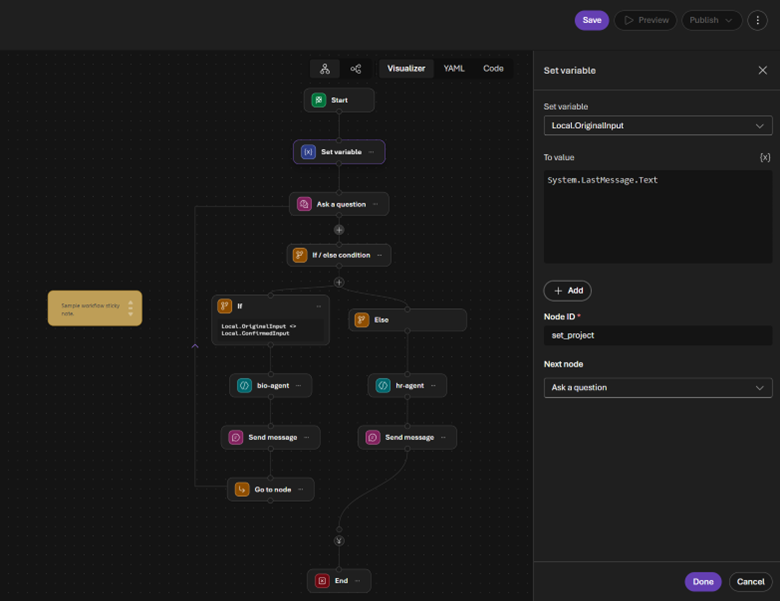
What’s interesting is that the new Foundry Project API doesn’t distinguish between workflows and agents; it treats workflows as agents. Therefore, the code I shared above would function identically if the agentName parameter happened to identify a workflow. This has started to influence my agent design methodology as it nods to the architectural principle of separation of concerns.
Following this approach produces simpler agents with leaner instructions can that are more specialized toward a particular use case’s prompt or data source. Then workflows let us orchestrate multiple agents together and tackle more complex scenarios. It is sort of the opposite of the top-down concept of sub-agents; it is more akin to composing agents bottom-up into a super-agent.
Here are some scenarios where workflows might prove useful:
- As a workaround to agents only being able to use a single tool per type (i.e., one agent can’t have two Azure AI Search connections)
- As a method to tweak the inputs/outputs of agents that are live in production and shouldn’t be modified
- As a way for no/low code users to implement complex agentic user stories
- As a simulation tool to model and experiment with adding AI to existing business processes
- As a data pipeline to populate JSON objects for non-chatbot agents
Structured JSON Outputs
I want to double click on that last one, as my recent research into Foundry agents with structured JSON outputs fits nicely into the workflow paradigm. As I’ll cover in the final post, “The Hard Way” now supports (spoiler alert) image extraction functionality, which required a second Azure AI Search index. I therefore had to spin up another agent to get that data and devise a way to combine it with query results from the original robot.
I was actually having pretty good luck tackling this with instructions only. Simply ending the agent’s mantra with something like “Format all your responses in JSON” and “Map field A from the search index to property B in the response JSON” gave me consistent results. However, now that we are consuming multiple agent output messages in code, I wanted something more resilient to errors and hallucinations.
To do this, head back to Foundry, load up an agent, and click the parameters button at the top. Then select “JSON Schema” from the “Text format” drop down, and a modal will be displayed asking for your schema. The JSON that describes your output is quite stringent; you must specify the “strict”:true property/value and include all fields in the “required” array. Also note that the root element must be an object.
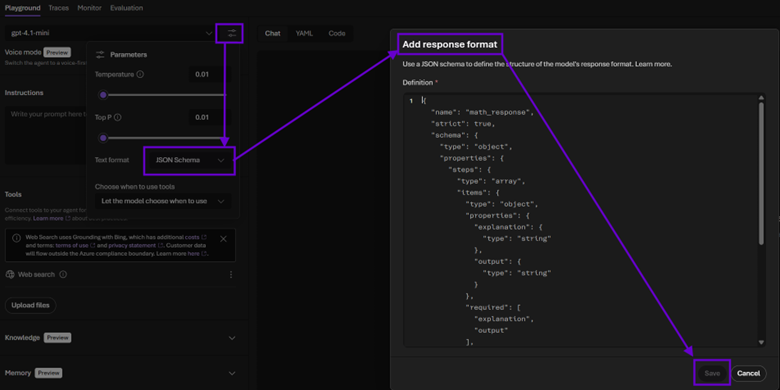
The GitHub repo linked at the end of this post has an “Agent JSON” solution folder with some examples. What’s nice about this approach is that including a decent “description” field value of each property seems to take the pressure off of having to explicitly tell the agent how to leverage its tools. For example, if you are consuming an Azure AI Search index, verbose mapping instructions can be replaced with contextual schema metadata describing each field. I haven’t tested this extensively but so far have experienced zero schema or data issues with robots fluent in JSON.
Conclusion
In the next post, I’ll show you how to promote your agentic backplane to higher logical environments (as physical Azure resource groups). But before we get there, it is important to ensure we are thinking about AI beyond the hype. It has been compared to electiciy in terms of its potential transformational value to Humanity.
While that may very well prove to be true (sometimes it feels like pure magic), it is also simply software: no different in that regard than any other SDK, API, or framework when examined under an architectural lens. Therefore, it should be treated with the same level of attention and love as our data, middleware, and UIs.
Microsoft Foundry gives us the tools to nicely layer AI functionality into our existing enterprise code as a separate logical tier. Framing these implementations as agentic backplanes opens the door to seamless integration into the custom systems of tomorrow, taking security, deployments, and production readiness along for the ride for free. Moving from simply consuming API endpoints to orchestrating Foundry agents programmatically is the key paradigm shift that I believe will start to differentiate true “AI apps” from mere “apps using AI.”
You can find the full code here.

.svg)