


Series Overview
You’ve made it to the end of the mountain trail! In this series’ final post, we return to the new Microsoft Foundry experience that I simply can’t get enough of. This time, after all our custom SharePoint extraction and Azure AI Search configuration work from the last few posts, we’ll connect our agent to a search index. If you’re here just for a Foundry + Search primer, then simply follow along and bring your own index to the party.
- Tradeoffs Between the Two Approaches
- SharePoint Knowledge Connections to Foundry Agents the Easy Way
- SharePoint Knowledge Connections to Foundry Agents the Hard Way
- Azure AI Search Knowledge Connections to Foundry Agents
Azure AI Search Knowledge Connections to Foundry Agents
As I mentioned above, weather you are repelling down the other side of AI mountain having stared the ascent with SharePoint and I on the other side, or just driving through the tunnel to quickly connect your Foundry agents to existing Azure AI Search indexes in your subscription, this process will show the out of the box bits using the new experience announced at Ignite 2025.
Let’s climb!
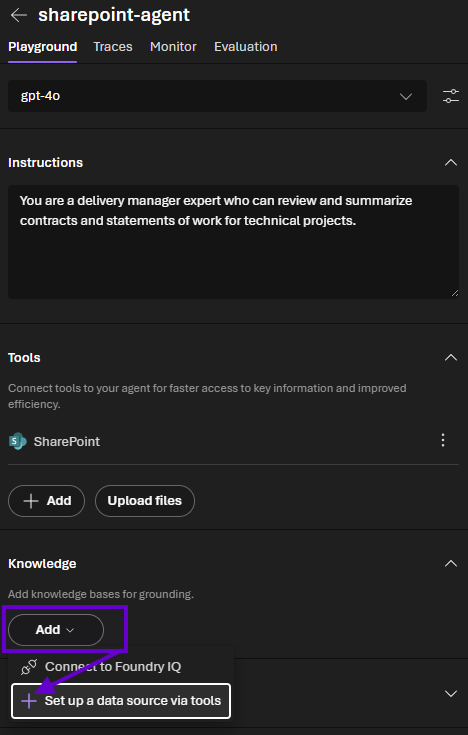
1) Starting with the agent we built back in the second post of this series (or working with a new one), let’s add another knowledge source from the “Add” dropdown below.
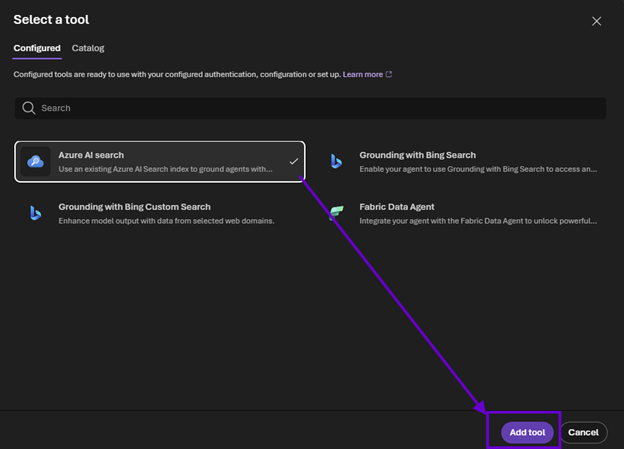
2) Select “Azure AI search” and click “Add tool.”
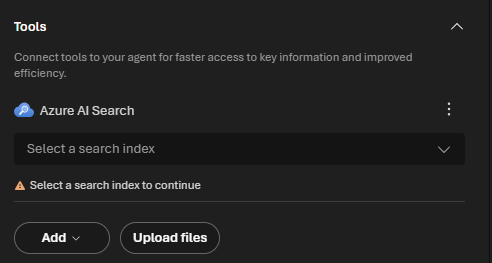
3) We see that some additional configuration is needed to identify which index holds our data.
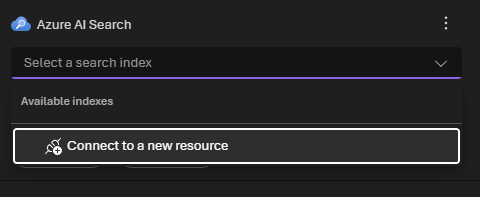
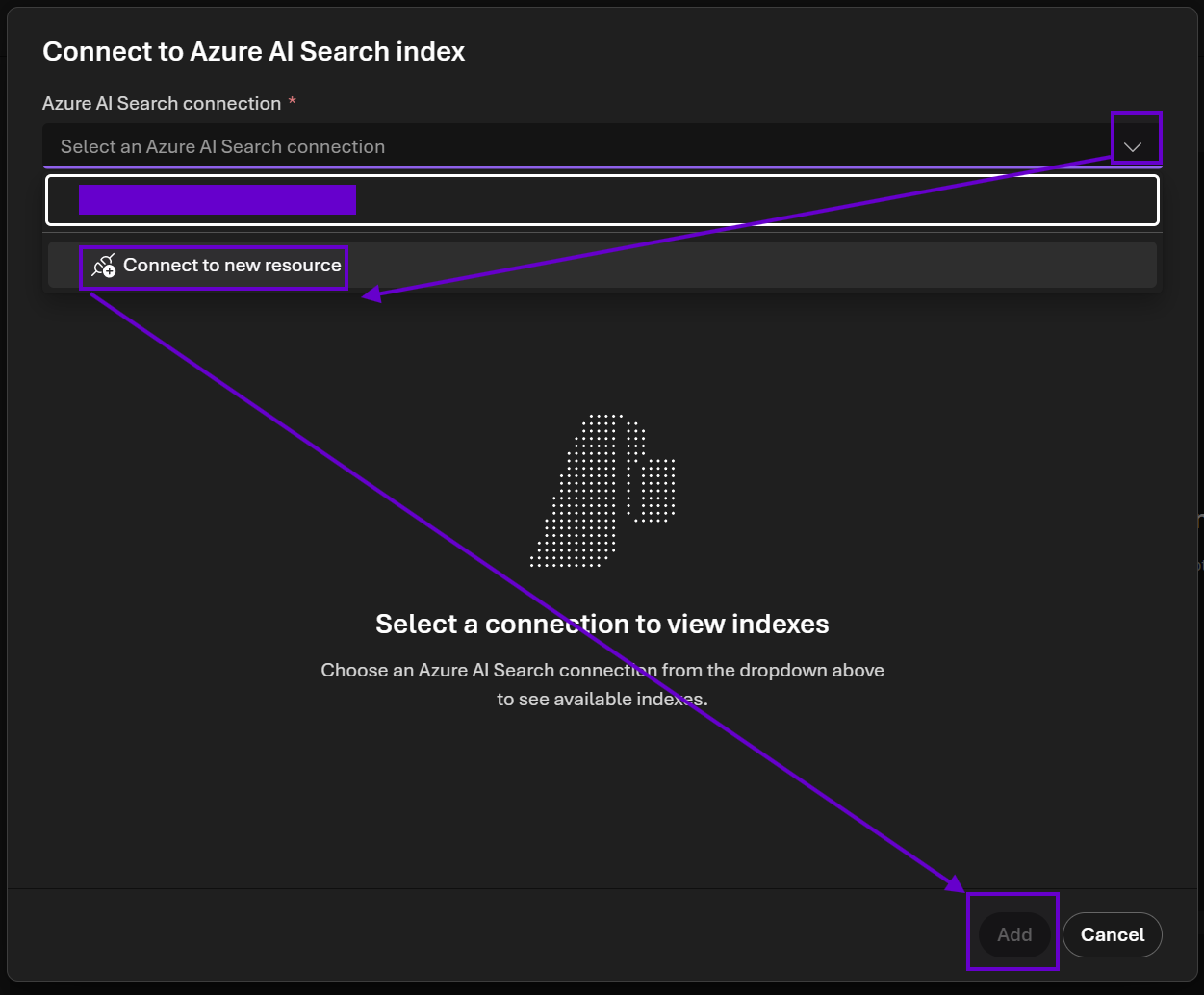
4) In the dropdown, select “Connect to a new resource.”
5) Select this again in the modal that pops up and then click "Add" at the bottom. Any existing connections will show up in the dropdown.
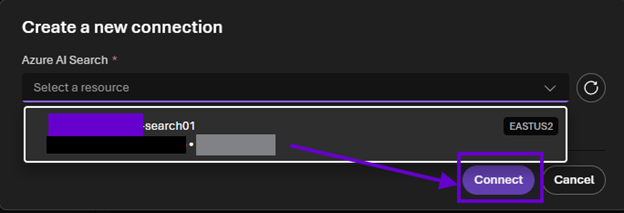
6) In the obnoxiously redacted screenshot below, the modal refreshes to show available Azure AI Search instances. The purple box is name of the PaaS resource, the black one is the subscription, and gray covers the resource group. My search instance appeared automatically for me, most likely because it’s in the same Azure subscription as the Foundry project. Select yours and click “Connect.”
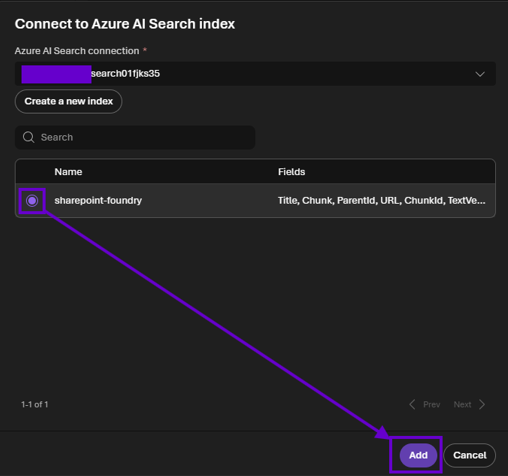
7) In the next screen, a connection name will be generated in the top field. Unlike the old Foundry experience, this modal will list out a summary of the search fields, which provides more context around your indexes if there are many to choose from. Click “Add” to create the connection and associate the tool with your agent.
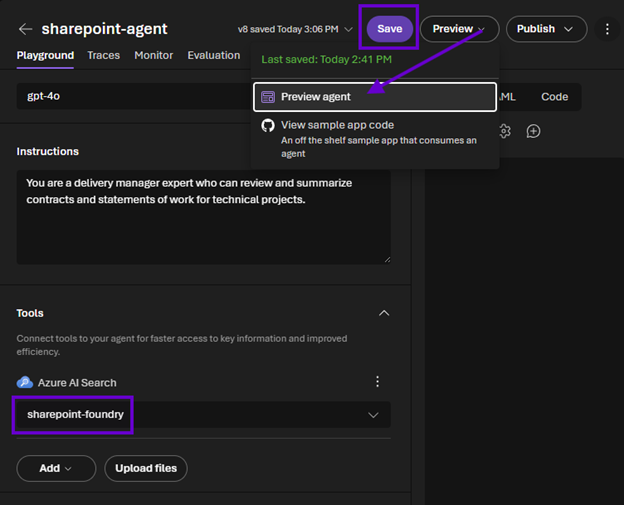
8) Back on the agent screen, the tool will be listed under "Azure AI Search." Note that you can’t add multiple knowledgebases of the same type, so return here if you need to add additional indexes. Finally, click “Save” and test things out in the chat interface on the right (as mentioned in the second post of this series, this feels much more streamlined and part of an intuitive AI agent building workstream compared to the previous Playground experience) or use the new “Preview” option to interact with the agent as users would in Foundry.
9) Another improvement I have observed over the old Foundry experience is that I no longer have to give the agent hints as to where the content is or how to find it. I used a very terse prompt below, and it knew exactly what I was looking for!

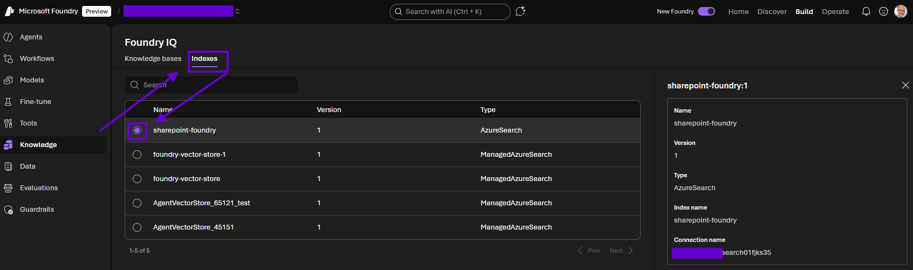
10) Finally, this portal keeps its data sources from across agents organized into a new area called “Foundry IQ.” As you tune your agents, this is a handy way to configure their knowledge. Specific to Azure AI Search, the “Indexes” tab is particularly useful to see what’s being leveraged.
And with that, we are done! In this series, we discussed how to climb the Microsoft Foundry AI mountain to reach the SharePoint knowledge peak and repel down the other side with vectorized document library content. “The Easy Way” leverages M365 Copilot licenses and modern site collections for a quick out of the box way to power your agents with SharePoint content.
“The Hard Way” alleviates these two requirements at the cost of some decent customization effort and investments in Power Automate premium and Azure AI Search. Burning extra customization calories comes with the benefit of more knobs to tune and thus more overall control over your users’ experience working with Foundry agents.
As your organization’s AI journey continues, it’s crucial to operationalize your data. Python querying Postgres used to be the only answer; I am so excited to see that Foundry is offering another path that’s being blazed along the vector (pun absolutely intended) of Microsoft’s technical approach which abstracts away the low-level plumbing and gives us the tools and services we need to solve the high-level hard problems at enterprise scale. Then when we do need to dig down and get into the pipes, they hand us the hard hats, shovels, and blowtorches we need to make our Foundry agents sing from atop AI mountain.

.svg)